PR Process
Opening a Pull Request
Once you have gotten your code far enough along that you are confident you’ll be
able to complete it, open a pull request (PR) to the staging branch. You might
also do this earlier if a maintainer requests to see your code in order to assist you.
For a larger features, a PR should be opened once you have meaningful progress. That way, it can be kept safe on GitHub and the maintainer can check in to see your status so your work is less of a mystery.
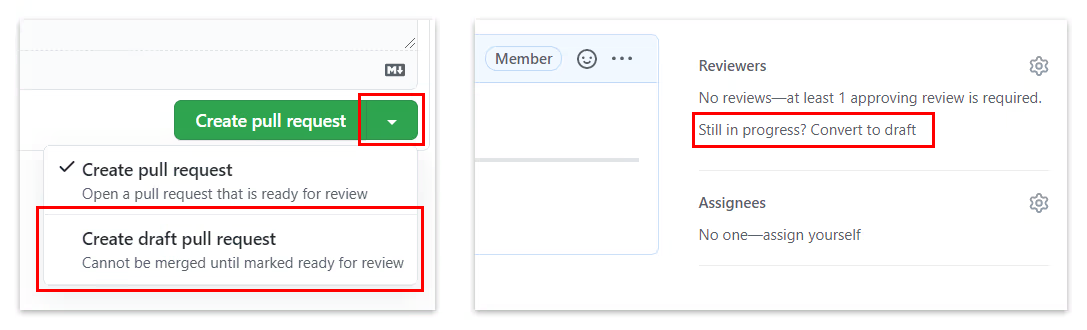
Here’s the important part: when you open a PR, it should be marked as a draft unless it is currently ready for review. The left image shows how to open a new PR as a draft, and the right image shows how to convert an existing PR to a draft.
When you believe your code implements the needed functionality and doesn’t introduce any new bugs or broken features you should mark it as ready for review. A reviewer will be automatically requested to review your PR if the team has a CODEOWNERS file. Otherwise, ping the same reviewer as the one you requested in the Governance PR.
Title and description
Please make sure to link the corresponding issue in the description of the PR. Make sure to address the acceptance criteria of the issue, with relevant screenshots or video clips if applicable. Avoid revealing sensitive information by using a Google Drive link with the “Anyone in CMU with the link can view” access permission. It will also be very helpful for the reviewers if you take a few minutes to write about what you changed.
If you have concerns about a certain approach you took or if a certain part of your code is as clean as it could be, you can leave comments on lines of your own code from the “Files changed” tab after opening the PR.
Code review etiquette
It is your responsibility to run the project locally, thoroughly test your work, and employ common sense to avoid wasting a reviewer’s time in needing to point out obvious flaws. It is not uncommon for inexperienced contributors to request review when their code entirely fails to implement the task at hand, or breaks surrounding functionality in a way that should have been immediately apparent. This doesn’t leave a good impression and can frustrate reviewers.
If you don’t actually understand what is intended with your feature/fix and why this is meaningful to a user of the project, spend time becoming that user and understanding the context. Learning at least the basics of using the project is important. Then ask questions in Slack if you’re still confused about specific edge cases or the wording of the task.
It is also common for larger tasks to enter a round of review to confirm the direction is correct before you go back and polish the remaining details of the implementation. It’s good to be in touch with the team to decide on when is the right time for this kind of preliminary review. It can save you effort reworking problems if you misunderstand the goals, or if the exact details of the requirements were never well-defined and you’ll need to iterate on the design together with the team. Don’t feel that every part of your PR needs to be 100% finished before requesting feedback, but also be clear so you aren’t taking a reviewer away from other work to point out that you are obviously nowhere near done.
Self-review
Before marking your PR as ready for review, you should do a self-review. That means reading over the diff of all your changes to ensure they are correct, complete, and lacking frivolous changes like unintended whitespace alterations, leftover debugging code, or commented-out lines. Read over it with a fine-toothed comb so reviewers don’t have to nitpick as much. It is only fair that your first code reviewer should be yourself, so you catch the obvious flaws first.
Passing CI
Upon pushing a commit to your PR’s branch, CI will need to build and test your code. PRs from forks will have to wait until a reviewer approves the CI run.
Your goal is for the all the checks required by the project to pass with a ✅. If it fails with a ❌, you will need to investigate. Occasionally, other checks may fail, but you likely won’t be responsible for fixing those and they can be ignored.
Keeping your work up-to-date
Be sure to start your work from the latest commit on the staging branch by pulling (git pull) with staging checked out when you begin coding.
As time goes on and staging accumulates new commits, your branch will become outdated. It has to be synced up with staging before your PR can be merged. Sometimes there will be conflicts that you need to resolve, which you can find learning resources for online.
When your branch can be updated with staging without conflicts, you can click the “Update branch” button below the CI status. If you click the dropdown button beside it, you can choose instead to update with a rebase. If this can be done without conflicts, this is preferred because it maintains a clean, linear history for your branch.
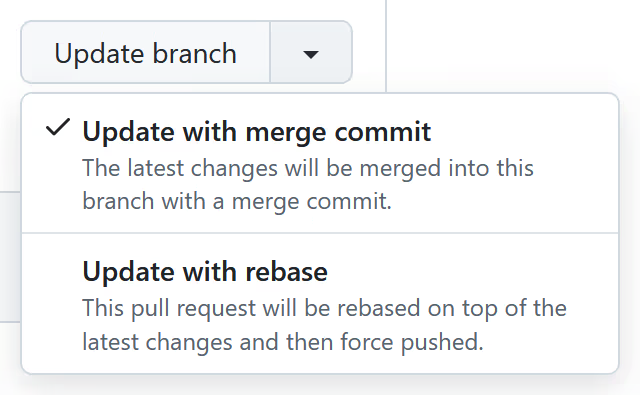
Be sure to pull the rebased, or updated-with-a-merge-commit, branch after you or a reviewer updates it (or pushes other commits to it) to ensure you are working on the latest code.
Review process
AI Code Review
ScottyLabs uses CodeRabbit for AI code reviews. It will automatically review your PR. Please respond to its comments and update your PR as needed. See AI Code Reviewers for configuration details.
Human Code Review
Assuming you have done what’s explained above, a reviewer will aim to review your PR within a few days if possible. Feel free to send reminders because PRs can get overlooked.
As a rule of thumb, at this stage you are about 50% done with your work. The other 50% of your time will be spent responding to feedback and making (sometimes significant) changes.
There are two parts to the review process, QA and code review, which occur separately:
-
Quality assurance (QA): A build of your code will be opened and tested to ensure it implements the requested functionality and doesn’t introduce regressions. This is not a substitute for your own testing, but it is a necessary line of defense against overlooked issues. Reviewers (and only reviewers) have the ability to invoke CI on your PR which will produce a Vercel preview link. That is a unique link hosting a build of your PR’s current code. If your change involves backend changes, a Railway dev server might also be built to test the backend changes, or if project doesn’t have a dev server environment, the changes will be tested locally and in the staging environment.
-
Code review: The code will be checked for flawed approaches, pitfalls, confusing logic, style guide adherence, sufficient comments and tests, and general quality. A review may be left through GitHub or your PR may have commits added to it. Feel free to read the diffs of those commits to understand what was changed so you can learn from that feedback. Direct commits are often faster than leaving dozens of comments. These can range from nitpicks to larger improvements. Our process is to collaborate on PRs as a team to write the best code possible, meaning your PR won’t always be exclusively written by you.
When changes are requested, the reviewer will usually mark the PR as a draft again while awaiting your updates. It is your responsibility to mark it as ready for review again once you’ve addressed the feedback.
- If a PR is a draft, the ball is in your court to move it forward.
- If it’s marked as ready for review, it means there is nothing more for you to do until the reviewer has time to review it.
After any number of back-and-forth cycles, a reviewer (usually Yuxiang who often gives the final say) will merge your PR. All your commits will be rebased on the staging branch. This keeps the Git history linear and easy to follow.
During each ScottyLabs work session,
the staging branch will be merged into the main branch, updating the live website.
Credited as a Contributor
Once your PR is merged and that you have also come to one ScottyLabs work session, you will be credited as a contributor in the corresponding team in Governance, forever!
Acknowledgment
The writing is adapted from the Graphite contribution guide. One of the ScottyLabs Tech Directors is a contributor to the Graphite project and had to write an analysis of its project processes in 17-313…